What’s new in Ingrid
Major additions, newest first. All changes includes the smaller improvements and fixes; Ingrid through the years shows the earlier editors.
Explore the features: Workspaces · Inspector · Reshaping · Diagrams · Tile types · Folding
Browse the history · 2021–2026
Earlier entries are reconstructed from surviving source. Development dates mark when work was added; release labels identify confirmed public versions. Current examples illustrate today’s capabilities; restored captures name their source date.
Tabs, panes and views
· Web 0.1.130
Keep several grids open in one workspace. Arrange them in tabs and panes, or use New View to work on an overview and its details together.
Overview pane
- Reading journal (visible)
- Weekly plan
Reading journal
|
Dune is folded here; the reading list stays open.
Dune pane
- Reading journal · Dune (visible)
Dune
|
Same journal, focused on one book.
Questions pane
- Reading journal · Questions (visible)
Questions
|
Same questions, unfolded in this view.
Reading journal has three views. Weekly plan is a separate grid in the second tab. Edits and Undo are shared within each grid; focus and folds belong to each view.
Views of one grid share edits and Undo, with their own focus and folds. Tabs, panes, focus and folds return on reload. Layout stays on this device; optional Sync carries grid content between devices.
Tabs, panes and windows on Desktop
· Desktop development
The Desktop workspace grows to support several grids, tabs, panes and windows. Views of the same grid share their document and editing history.
This is a private Desktop development milestone; it does not mark a public installer release.
Back up grids and their media
· Web development
Full Export packages grids and their image and audio assets in an .ingrid-backup.zip file. Full Import restores the archive and continues to accept older JSON backups.
Settings → Data → Backup
- Full ExportDownload all grids and their embedded media.
- Import backupBring a saved backup into this browser.
What happens on import
- New gridAdded to your local grids.
- Identical gridKept as it is.
- Different grid with the same IDImported as a copy; your local grid stays.
This work is included in Web 0.1.130.
A floating Inspector
· Web development
Keep the Inspector open in a floating panel while you work. Supported Chromium browsers can also place it in a separate picture-in-picture window; other browsers keep the floating panel.
Reading journal · Dune
Dune
|
Select a tile in the grid.
Tile Inspector
- Selected tile
- Dune
- Type
- Header
- Heading
- 2
- Style
- Soft green fill
- Render
- Children below
The Inspector follows the selected tile.
Available by Web 0.1.114. Desktop window support follows on October 1.
Review recovered changes
· Web development
Recovered changes opens a read-only preview of captured recovery data. Inspect it, copy a selection or export the recovered grid before deciding what to keep.
This is recovery for captured changes, not a permanent version archive. Available by Web 0.1.110.
A library of example grids
· Web development
Open example grids to explore nested notes, structured plans and mixed content. Converted TreeSheets examples join the library.
Reading Map · follow the rooms through an imaginary novel
Rooms
|
The library browser was implemented by Web 0.1.109. It currently requires a configured download library and is hidden in the public app.
Search commands in Help
· Web development
Searchable Help brought commands and keyboard shortcuts into a compact in-app reference.
Search Docs · “Ctrl+]”
- Indent selection or current rowKeyboard reference → Structure
Keyboard reference
- Shortcut
- Ctrl+]
- Action
- Indent selection or current row
Search results jump to this part of the guide.
It has since been replaced by searchable Docs. Help now opens that guide in a separate tab.
A compact interface and Inspector
· Web development
The toolbar, footer and Inspector are rebuilt around smaller grouped controls. Appearance controls and selectable themes sit alongside the grid without taking over the workspace.
Tile Inspector
- Selected tile
- Dune
- Type
- Header
- Heading
- 2
- Style
- Soft green fill
- Render
- Children below
The Inspector follows the selected tile.
This interface and searchable Help are available by Web 0.1.102.
Reuse tile appearance
· Web development
Copy and paste appearance between tiles, transfer it across a row, column, grid or nested tiles, or clear it without replacing the tile’s content.
One tile’s fill
Weekly plan
|
Transferred to its row
Weekly plan
|
Work with larger grids
· Web development
The editor mounts the visible portion of large grids instead of keeping every tile on screen. This reduces rendering work as documents grow.
Inventory · five records, three columns
SKU | Product | Category |
BV-01000 | Eco Bracket | Lighting |
ST-01001 | Premium Kettle | Safety |
ST-01002 | Recycled Helmet | Apparel |
TL-01003 | Folding Clamp | Hardware |
AP-01004 | Reinforced Crate | Lighting |
A homepage and user guide
· Web development
Ingrid gains its own public homepage and Docs, introducing nested grids, mixed content, structural editing and local storage.
Start with one note
Weekend plan |
Put plans inside it
Weekend plan
|
Native Desktop documents
· Desktop development
Desktop moves to .ingrid documents backed by SQLite, with embedded media and checks for changes made by another writer.
This is private Desktop development, separate from browser storage and public Web releases.
Link tiles
· Web development
Link tiles keep a readable label separate from the destination URL, alongside text, to-dos, code, math and media.
A source and its note
Sources
|
Print as a document
· Web development
Print the grid without application controls, flowing its content across pages. Later work improves preparation of images and long code blocks.
Reopen Ingrid offline
· Web development
A cached app shell lets a previously loaded Ingrid reopen offline. Locally saved grids remain available for editing without a connection.
Cloud Sync
· Production milestone
Optional Cloud Sync reaches production. Sign in with an email code to carry grid content between devices while keeping a local copy for offline work.
Saved
The grid’s changes are stored on this device.
Local saving works without a Sync subscription.
Synced
Cloud Sync has uploaded the grid’s changes.
Optional Sync connects your signed-in devices.
Export and restore your library
· Web development
Full Export backs up all locally stored grids and their media. Full Import can create missing grids or bring them in as copies.
Your newer local note stays
Water shapes power, trade and daily life. |
The backup returns as a copy
Water becomes political power. |
Transpose, sort and fold
· Web development
Transpose exchanges rows and columns, recursive folding controls deeper branches, and row sorting reorganizes structured notes.
Before Transpose
Weekly plan
|
After Transpose
Weekly plan
|
Find your place
· Web development
Find improves the presentation of ranked search results, while the minimap makes it easier to locate the current part of a grid. Search already existed in the April editor.
Find · “water”
- Water becomes political power.Reading journal → Dune → Summary
- Who controls the water?Reading journal → Dune → Questions
The parent path distinguishes each matching tile.
Diagrams in tiles
· Web development
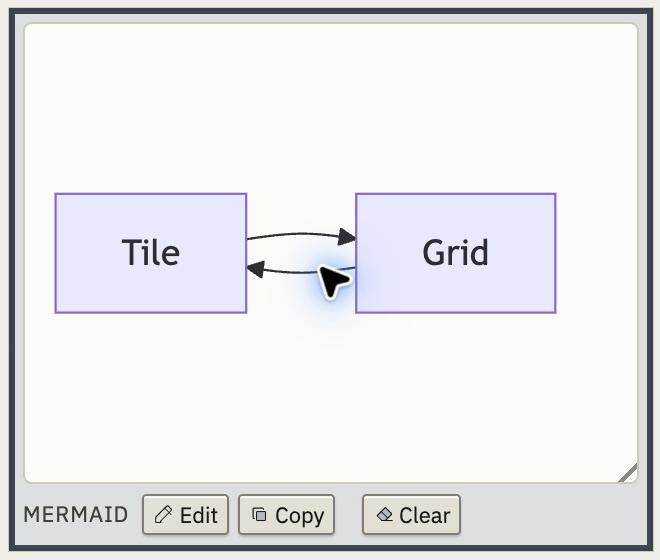
Mermaid, Graphviz and Pikchr source can produce diagrams inside the grid. Diagrams join the existing text, code, math and media tile types.
Portable grids and media
· Web development
Grid import and export carry embedded media. File drop and paste make it easier to bring content into a grid without managing separate asset folders.
Image
 |
Audio · try the one-second sample
Richer text and tile appearance
· Web development
Rich text and more tile appearance controls extend the editor’s original background colors, giving related notes their own emphasis and presentation.
Read next
|
A two-way TreeSheets bridge
· Web development
TreeSheets XML export joins import, so text and nested grid structure can travel in both directions. The format does not preserve Ingrid’s specialized tile types.
Ingrid grid
Weekly plan
|
After a TreeSheets XML round trip
Weekly plan
|
Fold and wrap nested grids
· Web development
Fold nested grids and wrap a selection into a parent tile. Wrap works with whole grids, rows, columns and rectangular selections. Multiple tiles can change type or background color together.
Folded
Questions 2 × 1 hidden |
Unfolded
Questions
|
Export a grid snapshot as JSON, or copy selections as plain text, HTML or Markdown.
Images, audio, code and to-dos
· Web development
To-dos, code, math, images, audio and video join text and headings. Media controls attach files or link to their sources.
Sound notes
|
Saved grids and search
· Web development
Create, rename and reopen locally saved grids, with autosave as you edit. Ranked search supports prefixes and fuzzy matches.
Open Grid
- Reading journalBooks, themes and questions
- Weekly planRead · Write · Review
Search saved grids, then open one in a tab or a pane.
Copy whole branches
· Web development
Copy, cut and paste structured selections while keeping their nested grids. TreeSheets XML import brings existing outlines into Ingrid.
Dune
|
The current editor begins
· Web development
A new editor foundation starts with editable nested grids, row and column operations, and Undo and Redo. It carries forward the nested-grid idea from the earlier Desktop work.
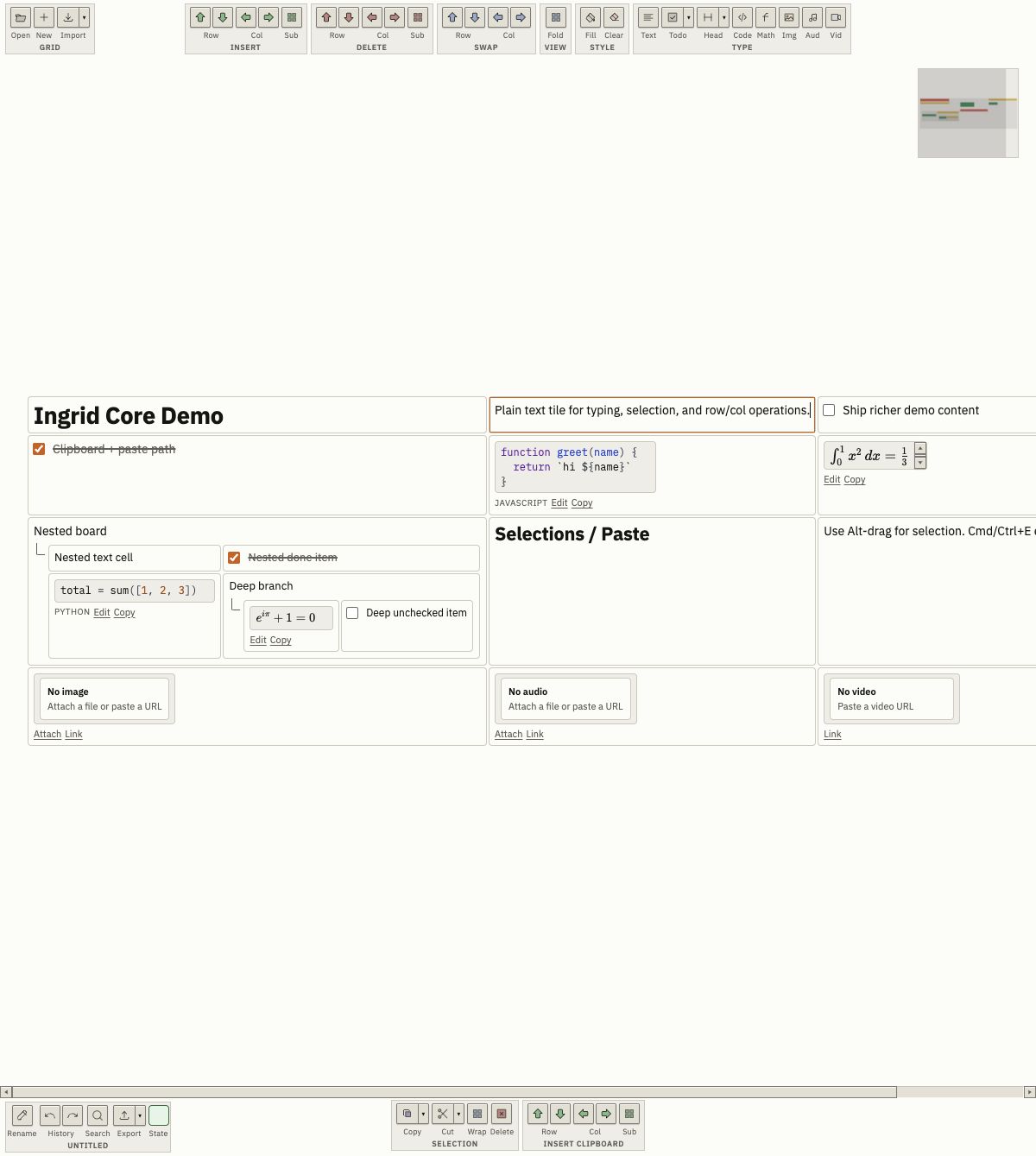
The early Desktop editor
· Desktop development
The early Desktop renderer combines nested grids, several tile types, structural actions, search and a minimap. The small colored action icons and grid-within-a-grid layout already point toward today’s Ingrid.
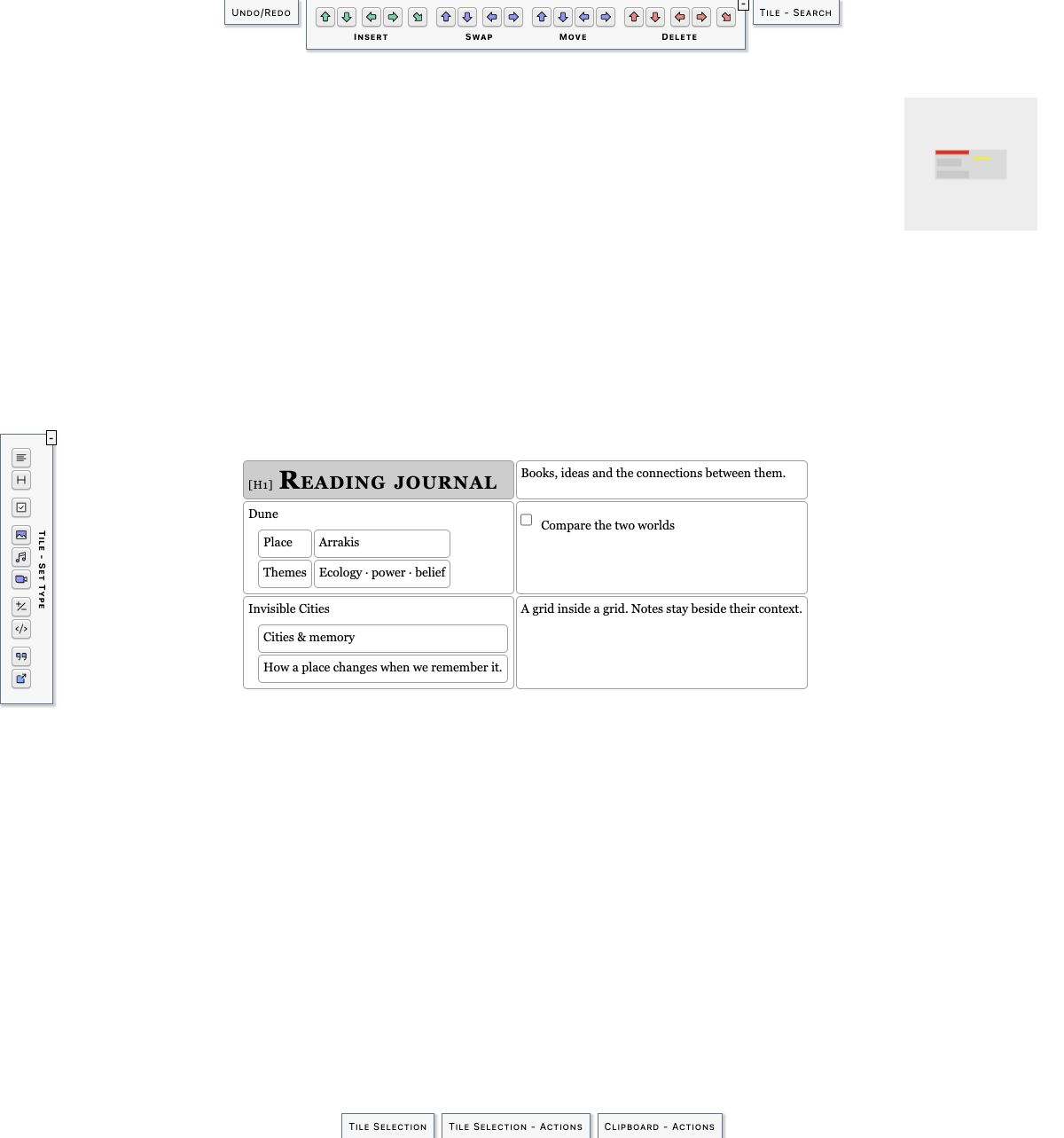
See the visual history for a restored capture from this source. This was development work, not a verified public release.
The earliest surviving source
· Source milestone
The preserved Desktop repository begins here. It is the earliest source record recovered for this history; it does not establish an original public launch date.